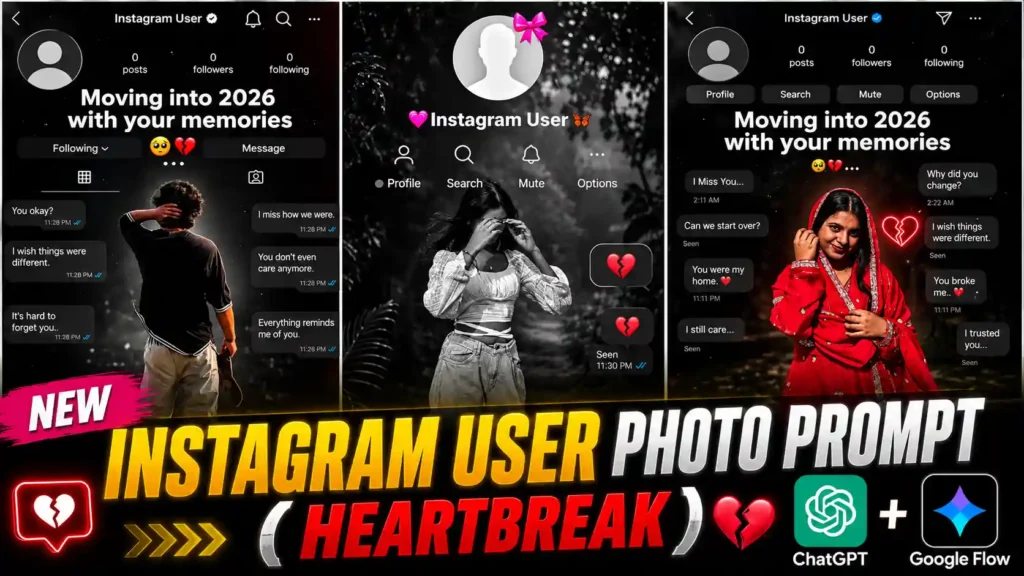
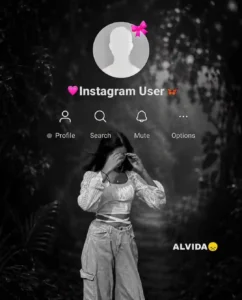
Instagram User Memories Photo Editing Prompt – Look, friends, if you use Instagram, then you must have seen this new trending photo somewhere or the other. In this photo, Instagram old memories are shown in a very emotional way. It looks as if we used to talk to someone on Instagram before, but after some time that person blocked us or moved away from our life. Background chats with emotional messages like “I Miss You” and similar texts are also shown. Along with this, a boy’s or girl’s photo is added in front, which makes the photo look even more emotional and cinematic. This is the reason why so many people are creating this trending photo and sharing it on Instagram. Today, I, Anup, will teach you how to create this viral Instagram old memories photo using a simple AI photo editing prompt. I will explain the complete process in the easiest way so that even if you are creating this type of photo for the first time, you will be able to make it without any problem.
Read More: Wall Painting Girl Photo Prompts
Instagram User Memories Photo Trend
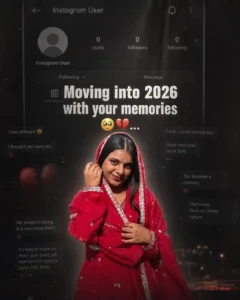
In this trending Instagram old memories photo, a complete emotional Instagram profile scene is created. At the top, an Instagram profile with a profile picture, username, and profile options is shown, making it look exactly like a real Instagram screen. Behind it, emotional chat messages are added, creating the feeling that two people were talking before, but everything changed after some time. Messages like “I Miss You” and other emotional texts make the photo look even more realistic. In the front, a boy’s or girl’s photo is placed naturally, while the black and white cinematic background gives it a sad memories feeling. This is the main reason why so many people are creating and sharing this viral trend on Instagram. The best part is that you do not need any editing skills to create this type of photo. You only need one clear selfie photo of yourself. After that, copy the ChatGPT photo prompt that we have provided below. Upload your selfie, paste the prompt, and send both together in ChatGPT. Within a short time, ChatGPT will automatically create the same Instagram old memories photo with a realistic and cinematic look. So, if you also want to create this trending photo in just one click, then use the prompt given below and follow the simple method explained in this article.
CREATE YOUR PHOTO
Create Your Instagram User AI Photo
Look, if you want to create this trending Instagram old memories photo, then first of all, you should have the ChatGPT app installed on your phone. After that, copy the prompt that we have provided above. Now open ChatGPT and upload your selfie photo, in which your face is clearly visible. Once your photo is uploaded, paste the copied prompt into the message box. Then send both the photo and the prompt together to ChatGPT. After that, you just have to wait for a short time because ChatGPT will start generating your photo. Within a few moments, your realistic Instagram old memories photo will be ready with the same emotional and cinematic look. Once the image is generated, simply tap on it and click the Save or Download icon. Your photo will be saved directly to your phone’s gallery. This is the easiest way to create this viral Instagram old memories photo, and you can make it in just one click without using any editing app or having any editing experience.
All Prompts: Open More Trending AI Photo Prompts
What Is the Heartbreak Instagram Memories Trend?
The Heartbreak Instagram Memories Trend is one of the most emotional AI photo editing trends that has become very popular on Instagram in recent days. In this trend, a normal selfie is transformed into a realistic Instagram memories scene that gives the feeling of remembering someone special. The image usually includes an Instagram profile, emotional chat messages, and a black-and-white cinematic background, making it look like an old conversation with someone who is no longer part of your life. This emotional concept is the biggest reason why millions of people are creating and sharing this type of photo on Instagram Reels and other social media platforms. Some people use it to express their feelings, while others create it simply because the editing style looks unique and attractive. The best part is that you do not need professional editing skills or expensive software to create it. With the help of ChatGPT and a well-written AI photo editing prompt, anyone can generate this trending image within a few moments. You only need a clear selfie and the right prompt to get a realistic output. If you also want to join this viral trend, then the Instagram User Memories Photo Editing Prompt provided in this article will help you create the same emotional and cinematic photo in just one click.
Last Word
I hope that after reading today’s article, you will be able to create this viral photo without any difficulty. We have explained the complete process in the easiest way so that even a beginner can generate this trending image in just one click. Simply use the Instagram User Memories Photo Editing Prompt given above, upload your selfie, and let ChatGPT create a realistic and emotional Instagram memories photo for you. If you liked this article or successfully created your photo, then do not forget to share your experience in the comments below. Your feedback motivates us to keep bringing more latest AI photo editing prompts and viral Instagram editing trends for you.