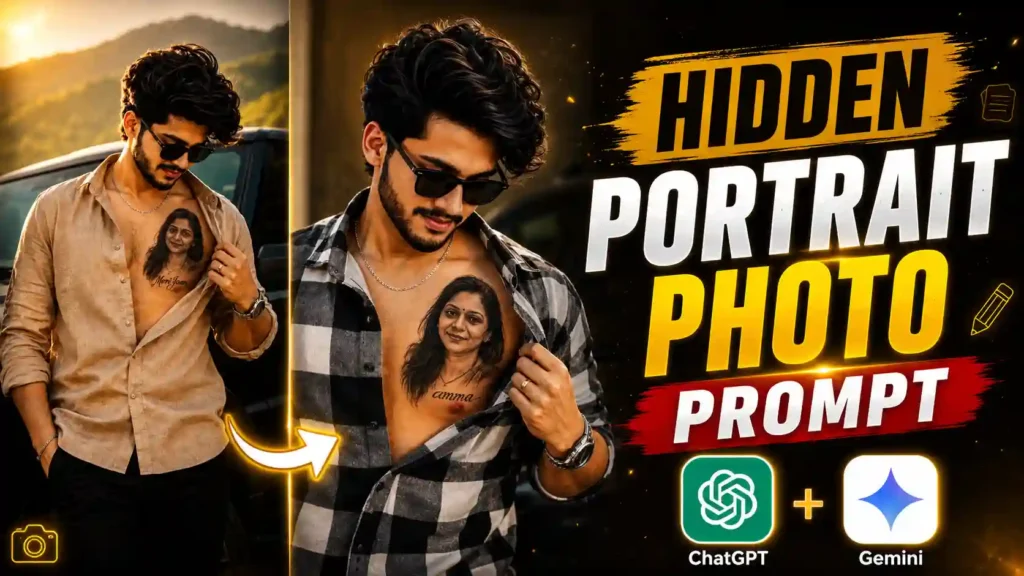
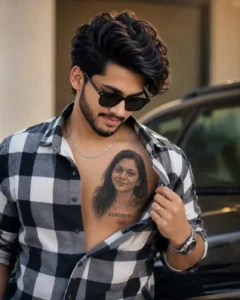
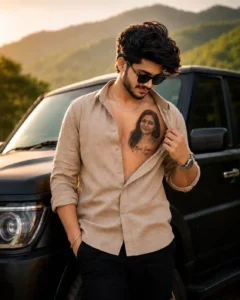
Portrait Tattoo AI Photo Editing Prompt – AI photo editing trends are becoming more popular every day, and new viral styles continue to dominate social media platforms like Instagram, Facebook, and YouTube Shorts. One of the latest trends attracting millions of views features a realistic portrait tattoo of someone special in a person’s life. This portrait can represent a mother, father, girlfriend, wife, best friend, or any loved one, making the image feel emotional and meaningful. The portrait is not fully visible because it remains partially hidden under the shirt, which adds a realistic and stylish touch to the overall photo. The person gently pulls the shirt aside with one hand, revealing only a small part of the portrait tattoo. This simple pose creates a premium cinematic effect that makes the image look highly realistic and eye-catching. The combination of natural lighting, detailed skin texture, realistic shadows, and professional color grading gives the final result the appearance of a high-quality DSLR photograph. This unique concept has quickly become one of the most shared AI photo trends on social media, and many creators are using it to create personalized and memorable images. If you also want to create this trending AI photo with the portrait of someone special, then you have come to the right place. My name is Anup Sagar, and in this step-by-step tutorial, I will show you how to create this viral AI photo in just one click using ChatGPT, without needing any professional photo editing skills.
Read More: instagram User AI Photo Editing
About This Portrait Tattoo AI Photo Trend
In this viral AI photo trend, the main highlight is a realistic portrait tattoo that represents someone special in the person’s life. It can feature the portrait of a mother, father, girlfriend, wife, best friend, or any loved one, making the image look both emotional and meaningful. The tattoo is carefully designed to appear naturally blended with the skin, featuring realistic shading, fine details, smooth skin texture, and professional lighting that perfectly matches the overall scene. Instead of showing the entire portrait, only a small portion remains visible because it is partially hidden under the shirt. The person gently pulls the shirt aside with one hand to reveal part of the portrait, creating a stylish and cinematic reveal effect that makes the photo stand out. The background is usually clean, softly blurred, and professionally color-graded, giving the final image a premium DSLR-like appearance. Every detail, including the facial expression, pose, lighting, shadows, and depth, is generated to make the photo look as realistic as possible. This is one of the main reasons why the trend has gained so much popularity across Instagram, Facebook, and YouTube Shorts. You can create this trending AI photo using tools like ChatGPT or Google Gemini, but in this tutorial, we will use ChatGPT because it consistently produces more realistic, detailed, and high-quality images with the help of a well-written AI prompt.
Ai Tattoo Photo Editing Prompt
Ai Tattoo Photo Prompt
CREATE PHOTO
Create Portrait Tattoo AI Photo
Creating this trending AI photo is much easier than you might think, and you don’t need any editing skills to make it. Before getting started, make sure you have two clear photos ready. The first photo should be your own portrait, which will be used as the main image. The second photo should be of the person whose portrait you want to appear as a realistic tattoo, such as your mother, father, girlfriend, wife, best friend, or any other loved one. For the best results, both images should be clear, high-quality, and have a visible face.
Once both photos are ready, open ChatGPT on your phone or computer and tap the + (Plus) icon located next to the message box. Upload both images together, then return to this article and scroll down to the AI prompt section. Copy the complete prompt exactly as provided and paste it into ChatGPT without making any changes. After pasting the prompt, simply send it along with the uploaded photos
.ChatGPT will carefully analyze both images and generate a realistic AI photo where the portrait of your loved one appears as a naturally blended tattoo. The final result usually takes a few moments to generate, depending on your internet connection and the AI processing time. Once the image is ready, open it in full size, check the quality, and save it to your device. You can then share your newly created viral AI photo on Instagram, Facebook, WhatsApp, X, or any other social media platform to join this trending AI photo challenge.
New Trend: Motu Patlu AI Video Editing (Full Guide)
Requirements to Create This AI Photo
Before you start creating this trending AI photo, make sure you have everything required for the best results. First, you will need two clear and high-quality photos. The first photo should be your own portrait, as it will be used as the main image for the AI generation. The second photo should be of the person whose portrait you want to appear as a realistic tattoo, such as your mother, father, girlfriend, wife, best friend, or any other loved one. Using high-resolution images with a clearly visible face will help ChatGPT generate a more realistic and detailed result. In addition to these two photos, you will also need the AI prompt provided earlier in this article. The prompt contains all the instructions required to create the final image accurately. Simply copy the complete prompt without making any changes and use it along with your uploaded photos in ChatGPT. Once you have these two photos and the Portrait Tattoo AI Photo Editing Prompt, you will have everything needed to create this viral AI photo quickly and easily.
Conclusion
I hope this tutorial has made it easy for you to understand the complete process of creating this trending AI photo. By following each step carefully and using the Portrait Tattoo AI Photo Editing Prompt provided in this article, you can generate a realistic, detailed, and high-quality AI image in just a few minutes. Always use clear, high-resolution photos and copy the prompt exactly as it is to achieve the best possible output. ChatGPT delivers excellent image quality, making it one of the best AI tools for creating viral photo edits. If you found this guide helpful, don’t forget to share it with your friends and family so they can also create this amazing AI photo. We regularly publish the latest AI photo editing tutorials, ChatGPT prompts, and viral editing trends. So, keep visiting our website for more Portrait Tattoo AI Photo Editing Prompt guides and stay updated with the newest AI photo editing ideas and creative prompt collections.