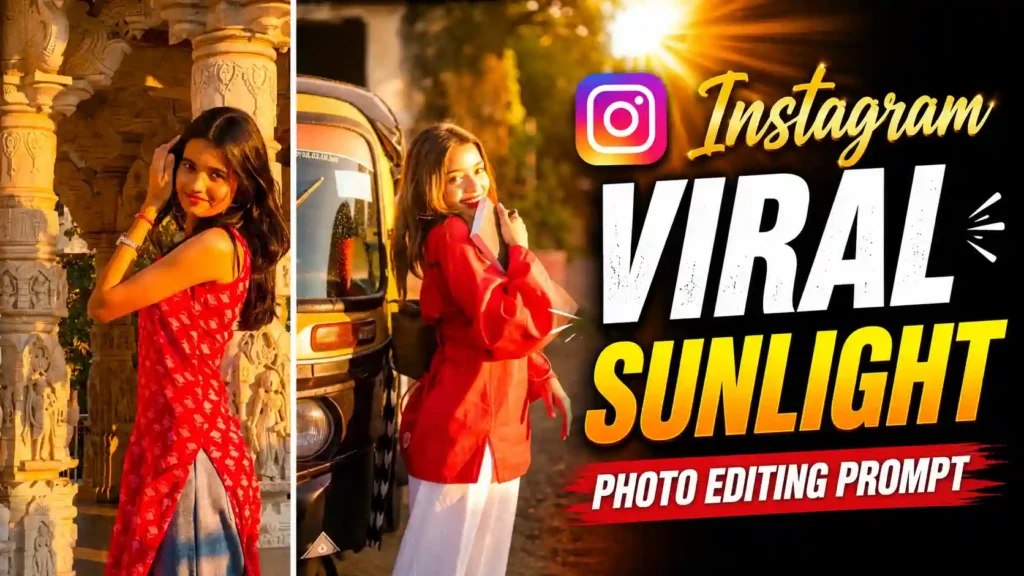
Instagram Sunlight Effect Photo Editing Guide – Look, friends, a new photo trend is becoming very viral on Instagram these days, and many people are creating their photos in this style and sharing them on their Instagram Stories. The special thing about this trend is the beautiful golden sunlight, which falls naturally on the face and background and gives the whole photo a very cinematic and aesthetic look. Because of this lighting, even a simple photo starts looking like it was captured by a professional camera. Friends, many people are also trying to create this type of photo using ChatGPT by giving it a prompt, but the result is not always as good as we want. Sometimes the lighting does not look natural, and sometimes the final photo does not have that realistic cinematic feel. So, instead of using ChatGPT for this trend, we are going to use Instagram itself. Instagram has a Restyle feature that can transform your photo into this trending style very easily. You only need to add your photo to your Instagram Story, use the Restyle option, and enter the right proper prompt. After that, Instagram can generate a beautiful golden sunlight effect that makes your photo look realistic, cinematic, and perfect for sharing on social media.
KRISHNA JI VIDEO EDITING
Why Use Instagram Restyle for This Trend?
Look, friends, if you want to create this type of golden sunlight and cinematic photo, then Instagram’s Restyle feature is one of the best options for this trend. The biggest benefit is that you can create the effect directly on Instagram without using any separate AI photo editing app. You just need your normal photo, and with the right prompt, Restyle can change its look while keeping your face and photo details natural. The golden sunlight effect is important in this trend because it gives the photo a warm, cinematic, and aesthetic appearance. This is why using Instagram itself makes more sense for this trend. You can see the result immediately and make changes if you do not like the first output. Friends, another good thing is that you can create the photo directly from your Instagram Story and use it there after editing. So, if you also want a realistic and viral photo without doing complicated editing, then Instagram Restyle can make the process easier for you. In this article, I will show you the method step by step.

How to Create This Viral Golden Sunlight Photo Using Instagram Restyle?
Look, friends, creating this viral golden sunlight photo using Instagram Restyle is very easy. You do not need any separate photo editing app for this. First, open Instagram and go to the Story section. Now select the photo that you want to edit and add it to your Story. After adding the photo, look for the Restyle option and tap on it. Here, you will get the option to enter a prompt for the type of look you want to create. Now you have to add the right prompt that can create the golden sunlight, cinematic lighting, realistic skin details, and aesthetic look. After entering the prompt, let Instagram generate the result and wait for a few seconds. Once the photo is generated, check the output carefully. If you want a different look, you can try the prompt again with small changes. Friends, you do not have to do any complicated editing because Instagram does most of the work itself. After you get the result you like, you can save the photo or directly share it on your Instagram Story.
COUPLE WALLPAPER PHOTO PROMPT
ChatGPT vs Instagram Restyle: Which Gives the Better Result?
Look, friends, if we compare the output of ChatGPT and Instagram Restyle for this trending golden sunlight photo, then Instagram Restyle gives a better result for this particular trend. ChatGPT can also create a realistic photo when you use the right prompt, but sometimes the golden sunlight does not look as natural as we want. The lighting, shadows, and overall cinematic effect may also look different from the reference style. On the other hand, Instagram Restyle is already made for changing the style and appearance of an existing photo. Because of this, it can give the photo a more natural-looking sunlight effect while keeping the original photo recognizable. Friends, this does not mean that ChatGPT is bad for photo editing. It is very useful for many different types of AI photo editing and can give amazing results with detailed prompts. But for this specific Instagram golden sunlight trend, Restyle is more convenient because you can create the effect directly inside Instagram. So, if your main goal is to create this exact trending aesthetic, I would recommend trying Instagram Restyle first.
Conclusion
So, friends, as you can see, creating this viral golden sunlight photo is very easy when you use Instagram Restyle. You do not need to use any complicated editing process or a separate AI photo editing app. You just need your photo, the right prompt, and Instagram Restyle. The golden sunlight effect makes the photo look cinematic, realistic, and aesthetic, which is why this trend is becoming so popular on social media. I hope this Instagram Sunlight Effect Photo Editing Guide helps you create your own trending photo easily. Friends, if you follow all the steps properly, you can create this type of photo in just a few minutes. So, try this trend with your own photo and share your result with us. If you like this guide, do let us know in the comments because your support always motivates us to bring more viral AI photo editing trends and useful tutorials for you.