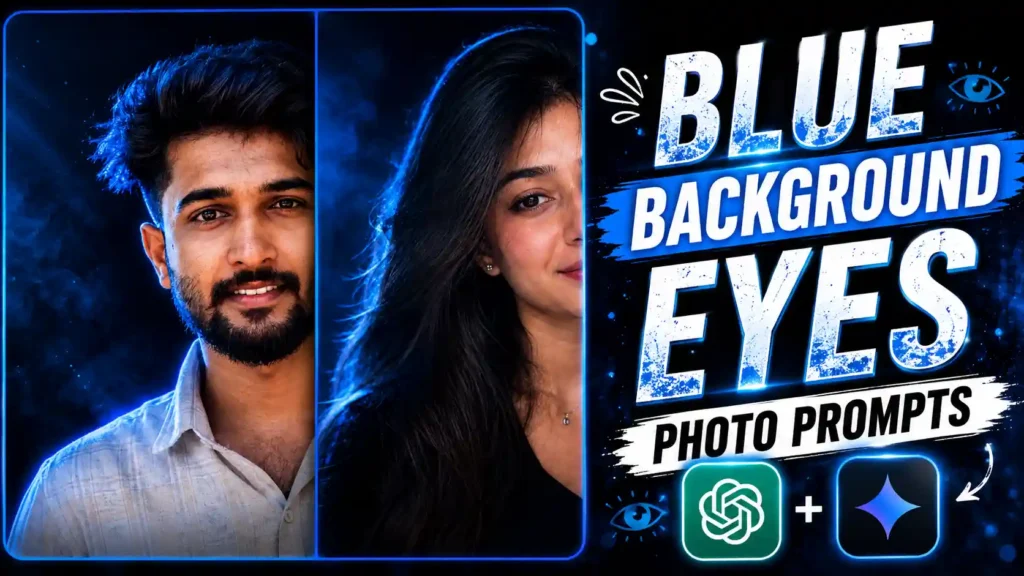
Blue Background Eyes Photo Editing Prompts – Just a few days ago, you must have seen that a photo with red background was going very viral on Instagram. In which red light keeps coming from the background. And it falls on our hair. Due to which that red color is visible on the edges of our hair. And a little bit it also starts appearing on our face. Due to this, this photo looks very cute. So friends, another new trend has come in the same way. But there are some changes in it. This is that blue light is used in place of red light. This is being done. And at the same time, our photo is also shown by zooming a little. Due to which the focus remains on our eyes the most. That is why we are calling this trend Blue Background Ice Photo Trend. Such photos are being created by both boys and girls. Today, I am going to explain to you the easiest way to create this type of trading photo. All you have to do is read this article from the beginning to the very last. And use only the prompts mentioned in it. Then you too will easily be able to create your own trending blue background close up ice photo like this.
More Prompts: AI Viral Photo Editing Prompts
Blue Background Eyes Photo Editing Prompts
So friends, this photo also does the same thing. In this, our focus is on our eyes and on our face. It is a very close up type of portrait. So that it becomes suitable for DP and profile picture. So that is why I told you guys that you can also put it on your profile photo. Otherwise, if you are creating it to post directly on Instagram, then you can do that too. This trend is becoming very popular because it gives your photo a stylish and premium look. The blue lighting effect makes the portrait look even more attractive. The close up angle also helps to highlight your facial expressions and eye details. Because of this, the final result looks more realistic and eye-catching. That is why many people are using this style for their Instagram profile picture and social media posts. We are going to create this photo using AI. And it will generate it in very high quality. After that, you can directly post it on Instagram or use it anywhere you want. Even after doing this, your photo quality will not be reduced. And it will appear in high quality.
Girls Photo Prompts
Boys Photo Prompts
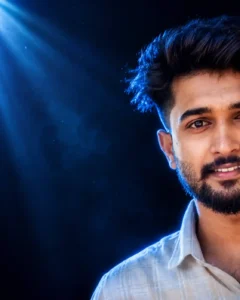
Use the uploaded reference image only for facial identity. Keep the face 100% identical—facial structure, proportions, hairstyle, beard, eyebrows, eyes, nose, lips, skin tone, expression, and all natural features unchanged.
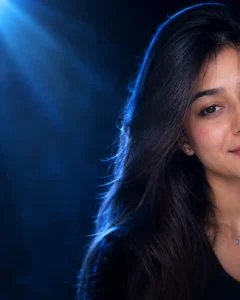
Ultra-realistic luxury cinematic studio portrait. Only the right half of the face (~50% crop), placed at the extreme right with wide negative space on the left. Direct eye contact with a genuine natural smile showing teeth.
Dark navy-to-black gradient studio background with subtle haze, blue volumetric light, and minimal blue particles. Soft beauty key light from the front-right, intense electric-blue rim and backlight outlining the hair and shoulders, plus a soft blue spotlight from the upper-left for dramatic contrast.
Canon EOS R5, RF 85mm, f/1.8, ISO 100, shallow DOF, HDR. Ultra-sharp eyes, realistic skin pores, detailed hair strands, photorealistic 8K editorial quality with deep blacks, cool blue highlights, and natural warm skin tones.
CREATE YOUR PHOTOS
How To Use Blue Background Prompts
Friends, to create your own photo using the blue background portrait photo prompt that we have given you above, first of all, you have to copy whatever photo you like the most from the above photos. After that, you have to go to ChatGPT. For that, you can install ChatGPT from the Play Store. Then open this app. And then click on the plus icon given there. First of all, add your selfie photo. You have to do this. And then paste the copied prompt there. Even after pasting the prompt along with the photo, you have to send it to ChatGPT. Now friends, ChatGPT will take some time to process your photo. Here, you may have to wait for one to two minutes. But ChatGPT now prepares it in less time. After waiting for some time, your photo will be created and presented in front of you. Then you can easily click on that photo and see it. You can also see and save it in your phone’s gallery by clicking on the save icon. In this way, you will be able to create a trending blue background photo.
Conclusion
By using the steps that we have given you above and the Blue Background Eyes Photo Editing Prompts, you can easily create this type of blue background light photo. Friends, we hope that you have liked our today’s article very much. If you have liked it, then please do let us know by commenting below. This gives us motivation. And we are able to write more articles like this. And see, tomorrow we will post another article. In which we will give you one more article. If we will guide you on how to create a new trading photo, then you guys can stay with us. And on our website, we have put prompts to create more different style photos. If you want, you can go and check them out too. You guys may like them very much.