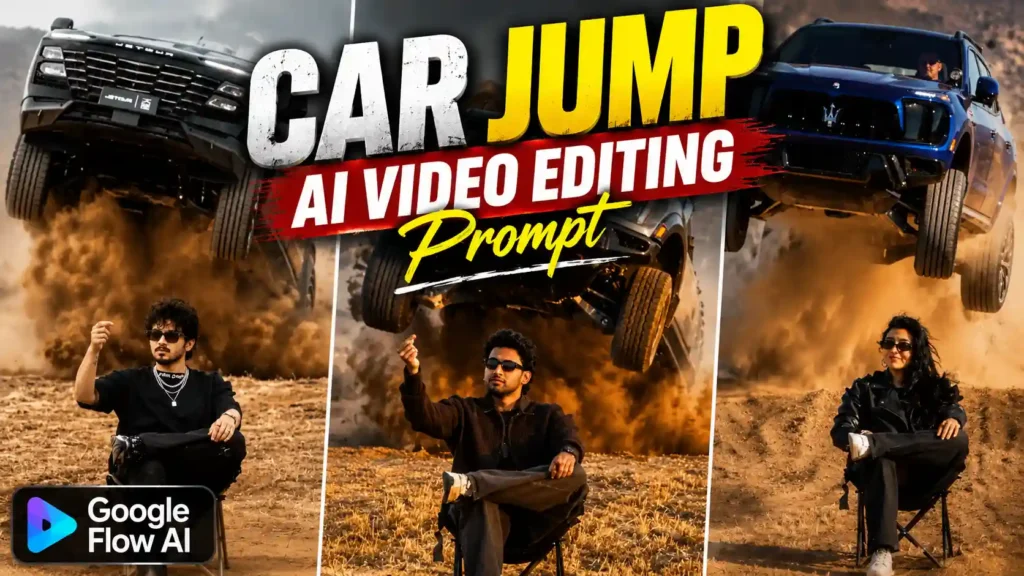
Car Jumping AI Video Editing Prompt – Nowadays, a new Car Jumping AI video trend is getting popular on Instagram, and many people are trying to make the same type of video with their own photos. In this trend, a boy or girl is sitting on a chair in a sandy or desert type place, wearing a black outfit and sunglasses. The person is sitting with a full attitude look, and after a few seconds, a big black luxury car suddenly comes from behind and jumps into the scene. A lot of dust comes out from under the car, which makes the whole video look more powerful and cinematic. The main person usually stays in a slow motion style while the car movement looks fast, giving the video that cool aura effect. This is the main reason why people are liking and sharing these videos on Instagram. The best part is that you do not need to shoot such a dangerous scene in real life. With the help of AI video editing tools, you can create this type of video using a photo and a proper prompt. In this article, I will explain how you can make your own Car Jumping AI video easily, what photo you should use, and which prompt can help you get this type of result.
REFRENCE VIDEO
What Is Shown in This Car Jumping AI Video Trend?
In this Car Jumping AI video trend, the main focus is on the person and the luxury car coming from behind. At the starting of the video, a boy or girl can be seen sitting on a simple chair in a wide sandy or desert type location. The person is normally wearing a black outfit with black sunglasses, which gives a stylish and attitude type look. The person sits very calmly and looks straight or slightly to the side, while the camera keeps the main focus on them. After a few seconds, the person raises one hand in the air and makes a finger snap, and just after that the real action starts. A large black luxury car suddenly comes from behind the person and jumps forward with high speed. The car looks big, expensive and powerful, giving the video a gangster type feel. When the car jumps, a lot of sand and dust can be seen flying around its wheels, which makes the scene look more dramatic. The car movement is usually shown in a slow motion style so every part of the jump can be seen clearly. At the same time, the person stays almost calm and confident in the front. The combination of black outfit, sunglasses, luxury car, flying dust and slow motion creates that strong aura look which makes these AI videos look very attractive.
CREATE VIDEO
How to Make This Car Jumping AI Video?
To make this Car Jumping AI video, first you should have your own clear photo so the AI can match your face properly in the video. After that, copy the video prompt given in this article. Now open the Flow AI website and select the video option from there. After selecting the video option, you will see a place where you can enter your prompt. Paste the copied prompt there. Now click on the media add icon given at the upper side and upload your own photo. Once the photo is added, click on the plus icon shown below and add the same photo there so Flow AI can use it as the reference for making the video. After adding your photo, send the photo and prompt together to Flow AI. Now the AI will start creating your video based on the prompt and your uploaded photo. Wait for the video to finish generating, because it can take some time depending on the tool. Once your video is ready, check the face, car movement, background and overall result properly. If everything looks good, simply save the video to your device and you can use it for your Instagram Reel or other social media.
BEST AI PHOTO EDITING
Things to Keep in Mind While Making the AI Video
While making this Car Jumping AI video, you should take care of a few small things so the final result looks better. First, always use a clear and good quality photo because the AI needs to understand your face and body properly. Make sure your face is clearly visible and there is not too much blur in the photo. A full body photo can also help when you want the AI to create the complete scene. If you want the video to look close to the trending style, you can use a photo where you are wearing a black outfit and sunglasses. Also, make sure you copy the complete prompt correctly and do not miss any important part while pasting it in Flow AI. After the video is generated, watch it once properly and check if your face looks correct, the car is coming from the right direction and the dust effect looks natural. Sometimes the first result may not come exactly as you expect, so you can generate the video again and check the new result. With a clear photo and the correct prompt, you can get a much better looking AI video.
Final Words
So, in this article I have tried to explain everything about the trending Car Jumping AI video and how you can make the same type of video with your own photo. You just need a clear photo, the right prompt and Flow AI to create this type of video. If your first result does not come out perfect, you can try again with the same prompt or a different photo. Once the video is ready, you can save it and share it on Instagram or other social media platforms. I hope this article helped you understand the complete process in a simple way. If you face any problem while making the video or have any doubt about the prompt, you can tell me in the comments. I will also keep sharing new AI photo and video editing trends and their prompts, so you can easily try them with your own photos.