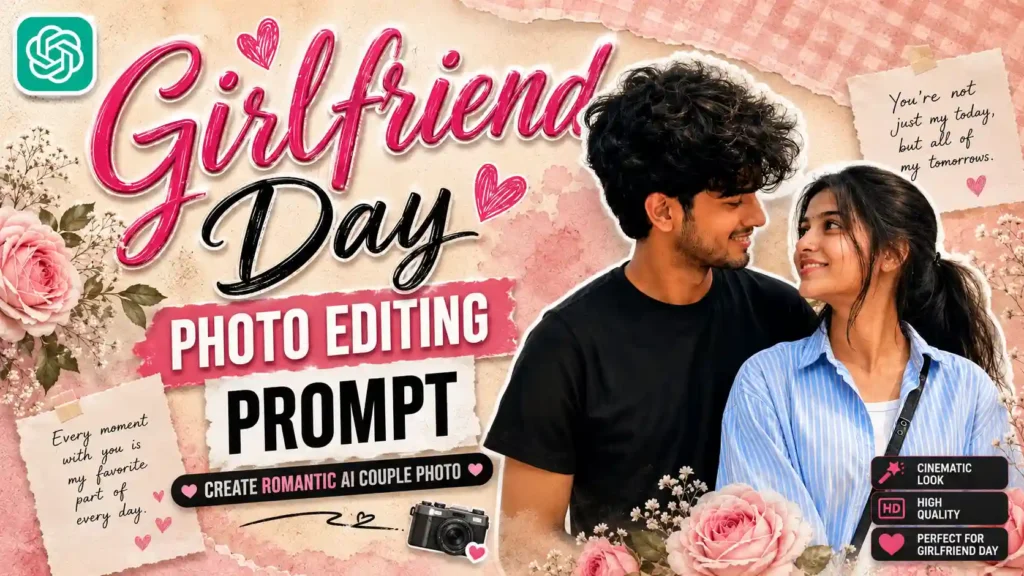
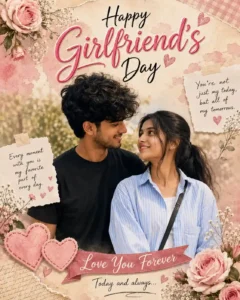
Girlfriend Day AI Photo Editing Prompts – Hello guys, my name is Anup Sagar, and I guide you on AI photo editing and trending prompt-based creations in the simplest way possible. Right now, a new Instagram trend is going viral where people are creating aesthetic “Happy Girlfriend’s Day” photos with their partner using AI. As you can see in the reference image, these photos usually feature a romantic pink theme, soft textures, handwritten-style quotes, and a couple pose that feels natural and emotional. The overall design looks like a premium greeting poster, which makes it perfect for sharing on social media during special occasions. The main reason this trend is growing so fast is because it allows anyone to turn a normal couple photo into a professional-looking, emotional memory without needing advanced editing skills. People love posting something unique and meaningful, and this trend gives both—visual appeal and emotional connection. The best part is that you can create this type of image using simple AI prompts with tools like ChatGPT or other AI image generators. In this article, I will show you how to create the same style photo step by step using an easy prompt method, so you can also make a beautiful Girlfriend’s Day post effortlessly.
New Tren: Viral Spidermen AI Photo Editing
Detailed Overview of This Girlfriend’s Day Photo Trend
This Girlfriend’s Day AI photo trend is all about creating a romantic, soft, and visually appealing poster-style image that looks both emotional and premium. In this trend, the main focus is on a couple photo placed at the center, where both individuals are shown in a natural and loving pose, usually looking at each other to create a genuine connection. Around the main image, designers add a pastel pink or warm-toned background with elements like flowers, hearts, paper textures, and aesthetic decorations that enhance the overall feel. Another important part of this trend is the use of meaningful quotes such as “Love You Forever,” “Forever Grateful to Have You,” or similar emotional lines that make the image more expressive. The typography also plays a big role, with stylish handwritten and bold fonts used to highlight “Happy Girlfriend’s Day” at the top. Lighting in these images is kept soft and warm to give a dreamy vibe, making the photo look more polished and social media ready. Overall, this trend combines emotions, design, and AI creativity to turn a simple couple photo into a memorable digital poster that people love to share.
Girlfriend Day Photo Editing Prompt
CREATE IMAGE
How to Create This Girlfriend’s Day AI Photo (Step-by-Step Guide)
Now let’s understand how you can create this trending Girlfriend’s Day AI photo easily. You can technically use tools like Gemini as well, but in this type of image there are many small text elements like quotes, headings, and decorative lines. Gemini often ignores small text details or generates them incorrectly. That’s why it’s better to use ChatGPT, because it handles text placement, spelling, and design structure much more accurately.
To create this photo, first click a clear selfie or couple photo so that the face and expressions match properly in the final output. After that, copy the prompt given above in the article and open ChatGPT. You can use both the app version or browser version, whichever you prefer. Once you are there, paste the prompt and then click on the “plus” icon to upload your image from the gallery. After uploading, simply send it to ChatGPT. Within a few moments, it will generate a high-quality Girlfriend’s Day poster-style image with proper text, design, and background. Finally, you can easily download and save the image and share it on Instagram or WhatsApp.
More Prompts: See More Trending Photo Prompts
Can You Use Separate Photos or One Photo?
Many people have this question that what if your photo and your girlfriend’s photo are separate, or what if you only have one photo together. So let me clear this for you in a very simple way. You can create this Girlfriend’s Day AI photo in both situations without any problem. If you have separate photos, then you can upload both images and the AI will combine them into a single romantic poster-style image with proper face matching and positioning. And if you don’t have separate photos and only have one photo together, then that also works perfectly fine. You just need to make sure that both faces are clearly visible in the image so that the AI can detect and process them properly. The better the face clarity, the better the final result will be. So you don’t need to worry about having perfect photos, because AI is flexible enough to handle both cases easily. Just use a clear image, follow the steps, and you will get a clean and beautiful output.
Final Thoughts
So overall, this Girlfriend’s Day AI photo trend is a perfect way to turn your normal couple picture into a beautiful and emotional memory that looks premium and social media ready. With the help of AI, you don’t need any professional editing skills—just a good photo and the right prompt can create an amazing result within seconds. As we discussed, using ChatGPT is the best option here because it handles text details, design layout, and overall composition much better compared to other tools. If you follow the steps properly and use the exact prompt, you can easily create a stunning poster-style image that will stand out on Instagram. This trend is not just about editing, it’s about expressing your feelings in a creative and modern way. So go ahead, try these Girlfriend Day AI Photo Editing Prompts, create your own design, and make your special moments even more memorable.