
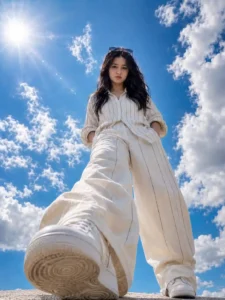
Sky Blue Cloud AI Photo Editing Prompt – Right now, this sky background editing trend is going crazy on Instagram. You must have seen these photos where a normal selfie turns into a super aesthetic wide-angle shot with a bright blue sky, soft clouds, and glowing sunlight in the background. The best part is, even when the sun is behind the subject, the face still looks clear, sharp, and properly lit, which makes the photo look very premium and eye-catching. Many creators are using this style to make their photos look more professional and viral-ready without using heavy editing apps. The good thing is, you can create this type of photo using any AI image creator by simply using the right prompt and a good reference selfie. But if you want a more detailed, high-quality, and realistic output, then I personally recommend using ChatGPT for this. That’s exactly what we are going to use in this guide. I will show you the easiest method to create this trending sky photo step by step, so even if you are a beginner, you can easily make your own viral-style image in just one click.
More Prompts: All Viral Photo Editing Prompts
About of Sky Blue Cloud AI Photo Trend
This sky background AI photo trend is getting viral because of its unique perspective and lighting style. In this type of edit, a normal selfie is transformed into a dramatic low-angle shot where the person looks taller and more confident, almost like a cinematic hero entry. The background is replaced with a deep blue sky filled with soft, fluffy clouds, and a bright sun flare is added to give a natural outdoor feel. One of the most interesting parts of this trend is the lighting balance—despite the sun being in the frame, the subject’s face remains clear, sharp, and well-exposed, which makes the photo look highly professional. The shadows are soft, highlights are controlled, and the overall image looks very crisp and clean. People also love this trend because it gives a premium DSLR-like effect without actually using expensive cameras or complicated editing software. The wide-angle look, combined with proper depth and realistic textures, makes the subject stand out strongly against the sky. This is why creators, influencers, and even beginners are trying this style to upgrade their Instagram feed and make their photos look more attractive, modern, and scroll-stopping.
Blue Sky Al Photo Prompt

Sky Blue Cloud Al Photo
Sky Effect Al Promot

CREATE IMAGE
Step-by-Step Guide to Create This Al Photo
Friends, if you want to create this trending sky background AI photo, then the process is very simple and easy to follow. First of all, you have to click your own clear selfie photo, because this photo will be used as a reference so that your face can match properly in the final image. Make sure your face is clearly visible and the lighting is decent, so that the AI can detect your features accurately and give a better result. After that, you have to copy the prompt given above in this article very carefully without missing any part. Now go to ChatGPT, and you can use both the mobile application and the browser version according to your convenience. Once you open ChatGPT, paste the prompt there. After pasting the prompt, you will see a plus icon or photo upload option, you have to click on it and select your selfie photo from your gallery and upload it. After uploading the photo, simply send it to ChatGPT along with the prompt. Now wait for a few seconds while the AI processes your request and generates the image. After some time, your sky background AI photo will be ready in front of you. Then you can open it and easily save it in your phone gallery and use it anywhere you want.
New Trend: Night Blue Photo Editing Prompts
Tips to Get More Realistic Sky AI Photos
Friends, if you want to get more realistic and high quality sky AI photos, then you have to focus on some important things while creating your image. First of all, always use a clear selfie where your face is properly visible, because a clean face helps the AI to match your features accurately. Try to click your photo in normal lighting, not too dark or too bright, so that the final result looks balanced. The angle of your selfie also matters a lot, a slightly low angle or natural pose gives a more cinematic and professional look in the final image. Keep your expression simple and natural, because over expressions can make the photo look less realistic. While using the prompt, make sure you include important words like blue sky, clouds, sunlight, and sharp face, because these details help in generating a better output. If you follow all these tips properly, then your final sky AI photo will look more crisp, attractive, and completely realistic.
Final Thoughts
So, friends, I hope that now you have understood this trend very well and you can easily create your own sky background AI photo without any confusion. This Sky Blue Cloud AI Photo Editing Prompt method is very simple and anyone can use it to create a realistic and high quality photo in just a few steps. If you follow all the steps properly and use the prompt correctly, then you will definitely get a very professional and eye-catching result. Friends, do try this trend once and share your photo on social media, you will get a very good response from people. If you liked this article, then do share it with your friends, and if you have any doubt, you can also ask in the comments. In the next article, I will again bring a new trending photo editing tutorial for you.