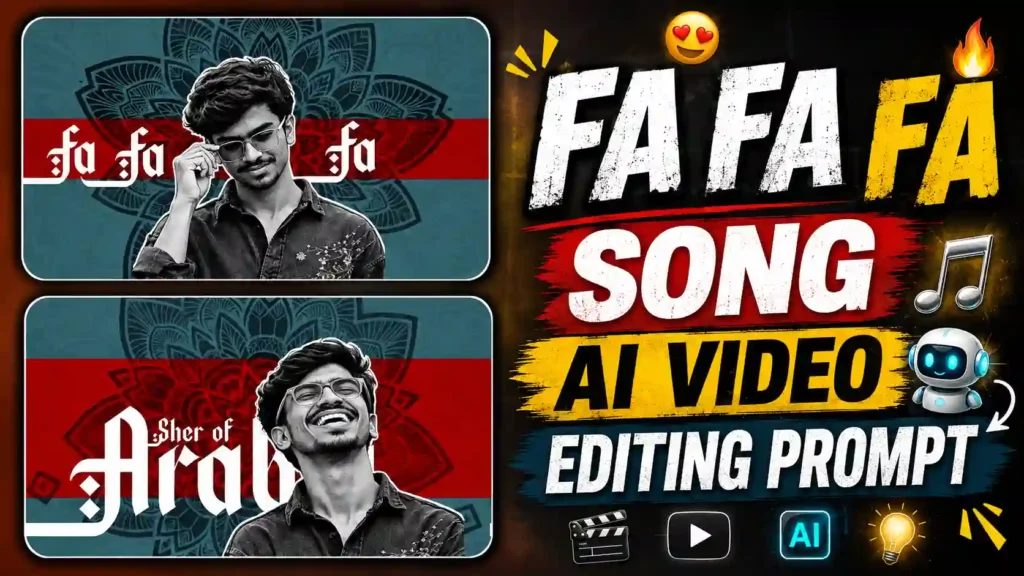
Fa Fa Fa Song AI Video Editing Prompt – Look friends, a new video trend is going viral on Instagram, and many people are making this video with their own photos. In this video, we can see our photos from different angles and poses. The photos keep moving on the screen in a cool way, so the video looks like a movie. In the background, FA FA FA text keeps coming again and again, and it moves with the music. We can see red and blue designs, moving patterns and effects in the background. When the song plays, the photos change with the beat, and different views of our face appear one after another. This makes the video look amazing, even when we are using only our normal photos. Friends, this trend is getting millions of views and people are sharing it on Instagram reels. If you have seen this FA FA FA photo video and want to make one with your own pictures, then you can make it very easily. For this, you do not need to learn hard editing or use many editing tools. We will use ChatGPT and Flow AI to make this video, and the process is very simple. Just follow the steps that I will tell you, and you can create the same type of trending video with your own photos by yourself too.
NEW CAPCUT TEMPLATE
How To Create FA FA FA AI Photo For Video?
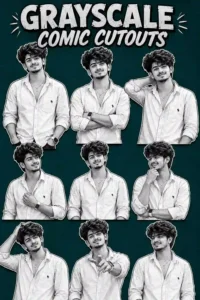
So, friends, to make this FA FA FA trending video, first of all, we have to create a special photo. In this photo, we will use our one normal picture and turn it into a collage of different poses and angles. In some photos, the boy will be looking upward, in some he will be making cute faces, and in some he will be looking in different directions. All these photos will be added together in one collage image. So, first of all, you have to open ChatGPT on your mobile or computer. After that, you have to add your normal photo in ChatGPT, which you want to use in this trending video. Now, you have to copy the photo creation prompt that I have given in this article. After copying the prompt, come back to ChatGPT an nhid paste it there along with your uploaded photo. Make sure you add both things properly before submitting. Now, you just have to click on the submit button and wait for a little time. ChatGPT will start creating your photo collage with different poses and camera angles. Friends, it may take a little time to create the image, so wait until the photo is ready. Once your collage photo is created, open it and check if all the poses are looking good. After that, simply save the created photo to your phone gallery because we will need this same photo in the next step to create our FA FA FA trending video.
GENERATE PHOTO
How to Create FA FA FA Trending Video Using Flow AI?
Now friends, our photo collage is ready, and it’s time to convert this photo into a video. For this, we are going to use Flow AI, which will help us create this FA FA FA trending video very easily. First of all, you have to copy the video creation prompt that I have given in this article. After copying the prompt, you have to open the Flow AI website on your mobile or computer. When the website opens, you will see an option to add your image. Now, you have to upload the same collage photo that we created earlier using ChatGPT. Make sure you select the correct photo from your gallery. After adding the photo, you have to paste the video prompt that you copied from this article. Friends, you have to add both things properly because the photo and prompt will help Flow AI understand what type of video you want to create. Once everything is ready, simply click on the send or generate button. Now, Flow AI will start creating your video according to the prompt. You just have to wait for a little time until the video generation process is complete. After some time, your FA FA FA cinematic video will be ready with moving photos and different camera angles. Once the video is created, play it and check how it looks. If everything is looking good, simply save the video to your device. In this way, your trending video is ready to share on Instagram Reels.
VIDEO PROMPT

REFERENCE VIDEO
GENRATE VIDEO
Fa Fa Fa Song AI Video Editing Prompt
Friends, when this FA FA FA video starts, first we can see a background with blue and red colours. A design keeps moving in the background, and it gives the video a look. In the middle, our photo appears in a black and white style. The photo is not looking like a normal picture because it has a cutout and a white outline around the person. After that, the photo keeps changing its position and angle with the beat of the FA FA FA song. In some parts, we can see the person standing in the middle, while in other parts the photo moves to one side and different text appears around it. The words FA FA FA also come on the screen in a font, and they keep changing with the music. The red strip in the background makes the text and photo look more clear. There are also some moving patterns behind the person, which keep playing like an animation. Friends, the best thing is that the same person can be shown in different poses, so it feels like many camera shots are used in one video. The photos move smoothly, and every change happens according to the song beat. Because of these photo movements, text effects and background animation, the video looks like a short cinematic edit. This is the style of FA FA FA trend that people are posting on Instagram.
Conclusion
So, friends, in this way, you can easily create your own FA FA FA trending video using ChatGPT and Flow AI. You just need one normal photo, and ChatGPT will help you create different poses and angles. After that, Flow AI will turn your photo into an amazing cinematic video. You do not need any editing skills or spend hours editing everything manually. Just follow the steps given in this article and use the prompts to create your video. Friends, I hope you have understood how to make this viral Instagram video. Now, try it with your own photos and share your video on Instagram. If you like this trick, then don’t forget to share this article with your friends.